
Why Online Payments Matter in 2025
The expectation has shifted. Customers increasingly expect to pay online, whether they’re buying products, booking services, or paying invoices.
For Western Sydney businesses, adding payment capability to your website means:
- Getting paid faster (no chasing invoices)
- Converting more visitors (remove friction from buying)
- Looking professional (customers trust businesses that accept cards)
- Operating 24/7 (take payments while you sleep)
The good news: adding payments is easier and more affordable than ever. Let’s walk through your options and implementation.
Payment Processing Basics
Before diving into solutions, understand how online payments work:
The Players Involved
Customer: Has a credit card, debit card, or digital wallet Your Website: Presents the payment form Payment Gateway: Securely transmits payment data Payment Processor: Handles the actual transaction Acquiring Bank: Receives funds on your behalf Issuing Bank: Customer’s bank that issued their card
Most modern solutions combine gateway and processor, simplifying the process.
How Money Flows
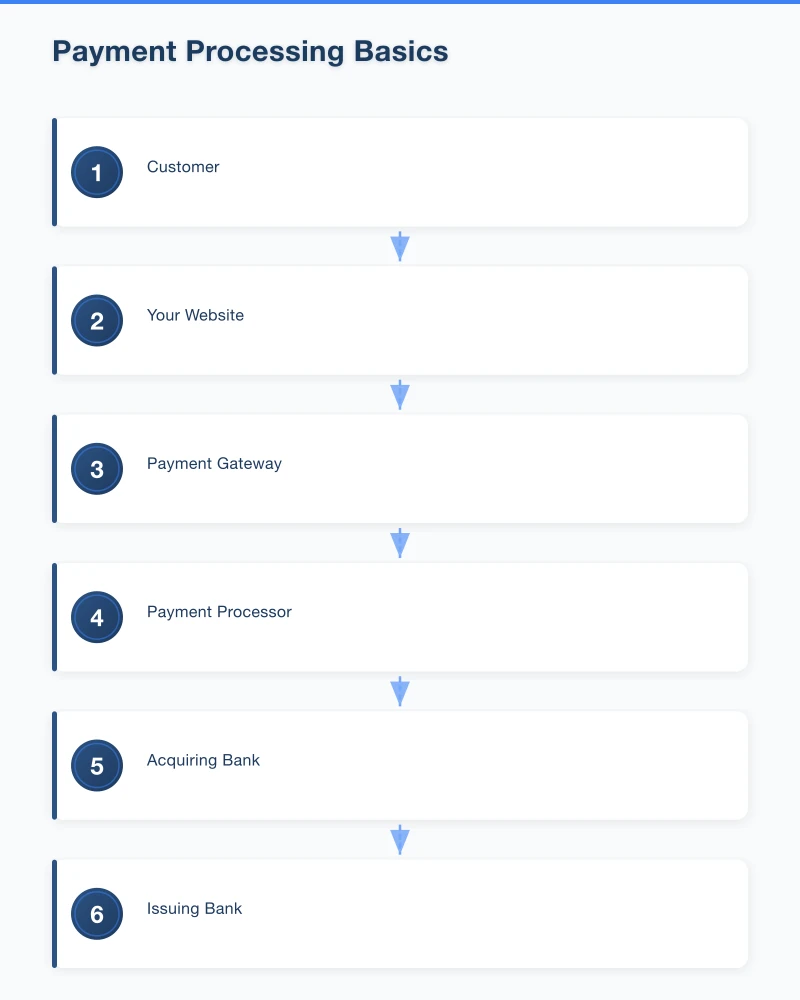
- Customer enters payment details on your site
- Payment is authorised (card is valid, funds available)
- Transaction is processed (usually settles within 1-2 business days)
- Funds appear in your bank account (minus fees)
The whole process feels instant to customers, but actual fund movement takes 1-3 business days.
Typical Fees
Australian payment processing costs:
- Per-transaction percentage: 1.5% - 3%
- Per-transaction fixed fee: $0.30 - $0.50
- Monthly fees: $0 - $30 (varies by provider)
For a $100 transaction with typical rates (1.75% + $0.30), you’d pay about $2.05 in fees.
Volume matters. Higher transaction counts often qualify for lower rates.
Payment Solution Options
Here are the main options for Australian businesses:
Stripe
What It Is: The most popular payment platform for websites. Developer-friendly, comprehensive features.
Fees: 1.75% + $0.30 per transaction (standard pricing)
Pros:
- Excellent documentation and developer tools
- Beautiful, mobile-friendly checkout
- Handles subscriptions and invoices
- Strong fraud protection
- Fast payouts (2 business days)
Cons:
- Higher fees for international cards (extra 1.5%)
- Account stability concerns for some industries
- Customer service can be slow
Best For: Most websites, especially tech-savvy businesses or those with developers.
Square
What It Is: Known for in-person payments, but has solid online payment options too.
Fees: 2.2% per transaction online
Pros:
- Unified in-person and online payments
- Free online store option
- Easy invoicing
- Good for retail with both physical and online presence
Cons:
- Higher online rates than Stripe
- Fewer developer integrations
- Less flexible for custom implementations
Best For: Retail businesses with both physical and online presence.
PayPal
What It Is: The original online payment method. Still widely used and trusted.
Fees: 2.6% + $0.30 per transaction
Pros:
- High customer trust and recognition
- Buyer protection appeals to cautious customers
- Easy setup with PayPal Buttons
- Customers don’t need to enter card details if they have PayPal
Cons:
- Higher fees than Stripe
- Account freezes have frustrated businesses
- PayPal disputes can favour buyers heavily
- Less professional appearance than modern alternatives
Best For: Offering as a secondary option alongside cards. Some customers strongly prefer PayPal.
Afterpay/Zip (Buy Now, Pay Later)
What It Is: Let customers pay in instalments. You get paid immediately.
Fees: 4-6% + $0.30 per transaction (higher than card payments)
Pros:
- Increases conversion for larger purchases
- Attracts younger demographics
- You receive full payment upfront
- BNPL provider handles payment risk
Cons:
- High fees reduce margin
- May encourage overspending (ethical consideration)
- Not suitable for all products/services
Best For: Retail, especially items $100-$1,000. Less common for services.
Bank-Integrated Solutions
What It Is: Direct integrations from Australian banks (CommBank, ANZ, etc.).
Fees: Varies, often competitive for high-volume
Pros:
- Direct relationship with your bank
- May offer better rates for existing customers
- Local support
Cons:
- Often outdated technology
- Less flexible than modern options
- Slower innovation
Best For: Businesses with existing strong bank relationships and high volume.
Payment Links (No Website Changes)
What It Is: Generate payment links to send via email, SMS, or social media.
Providers: Stripe Payment Links, Square Invoices, PayPal.Me
Best For: Service businesses that don’t need a full checkout but want to accept payments easily.
Choosing the Right Solution
Consider these factors:
Your Business Model
E-commerce (Selling Products):
- Stripe or Square for primary payments
- PayPal as secondary option
- Consider Afterpay for higher-priced items
Services (Invoicing Clients):
- Stripe Invoices or Square Invoices
- Xero/MYOB integrated payments
- Payment links for simplicity
Subscriptions (Recurring Payments):
- Stripe handles subscriptions excellently
- Dedicated platforms like Chargebee for complex needs
Bookings/Appointments:
- Many booking systems include payments (Acuity, Calendly)
- Or integrate Stripe with your existing system
Your Technical Capability
No Developer Available:
- PayPal Buttons (copy-paste)
- Square Online checkout
- Stripe Payment Links
- WordPress plugins (WooCommerce Payments, Easy Digital Downloads)
Some Technical Skill:
- Stripe Checkout (hosted payment page)
- Square Web Payments SDK
Developer Available:
- Full Stripe integration
- Custom checkout experiences
- Multiple payment options
Your Volume and Margins
Low Volume (Under $10K/month):
- Standard pricing is fine
- Focus on simplicity over savings
- Stripe or Square standard plans
Medium Volume ($10K-$100K/month):
- Negotiate rates (especially with Stripe)
- Consider multiple providers for redundancy
- Watch international card fees
High Volume (Over $100K/month):
- Custom pricing negotiations
- Multiple processor relationships
- Consider direct bank integrations
Implementation: Step by Step
Here’s how to actually set this up:
Option 1: WordPress + WooCommerce
Most straightforward for product sales:
Step 1: Install WooCommerce (free plugin) Step 2: Complete WooCommerce setup wizard Step 3: Add products with prices Step 4: Configure payment gateways
For payments:
- WooCommerce Payments (powered by Stripe): Install plugin, connect account
- Stripe for WooCommerce: Install official Stripe plugin
- PayPal: WooCommerce includes PayPal support
Step 5: Test purchases thoroughly Step 6: Go live
Option 2: Stripe Checkout (Any Website)
For custom websites or simple payment needs:
Step 1: Create Stripe account at stripe.com
Step 2: Get your API keys (Dashboard > Developers > API keys)
Step 3: Use Stripe Checkout for hosted payments:
<button id="checkout-button">Buy Now - $99</button>

<script src="https://js.stripe.com/v3/"></script>
<script>
  const stripe = Stripe('your-publishable-key');

  document.getElementById('checkout-button').addEventListener('click', function () {
    stripe.redirectToCheckout({
      lineItems: [{price: 'price_abc123', quantity: 1}],
      mode: 'payment',
      successUrl: 'https://yoursite.com/success',
      cancelUrl: 'https://yoursite.com/cancelled',
    });
  });
</script>
Step 4: Create products and prices in Stripe Dashboard
Step 5: Test with Stripe’s test card numbers
Option 3: Payment Links (Zero Code)
Simplest option:
Step 1: Create Stripe account
Step 2: Go to Products, create a product with price
Step 3: Click “Create payment link”
Step 4: Share link anywhere (email, website button, social media)
Customers click, pay on Stripe’s hosted page, and you receive notification.
Option 4: Invoice Payments
For service businesses:
Step 1: Use Stripe Invoicing, Square Invoices, or accounting software (Xero, MYOB)
Step 2: Create invoice with “Pay Online” button
Step 3: Send to customer
Step 4: Customer pays via link in invoice
Step 5: Payment records automatically in your system
Australian-Specific Considerations
GST Handling
If your business is registered for GST, your prices should include GST. Payment platforms can display GST separately:
- Configure tax settings in your payment platform
- Ensure invoices show GST breakdown
- Match with your accounting software
Surcharging Rules
As of 2017, Australian businesses can pass credit card surcharges to customers, but only the actual cost. Common approaches:
- Absorb fees (most common for consumer businesses)
- Add line item surcharge (transparent but unpopular)
- Price into products (hidden but simple)
Check ACCC guidelines for current rules.
Currency Handling
If you receive international payments:
- Stripe supports multi-currency
- Be clear about which currency customers are charged
- Understand conversion fees
For most Western Sydney businesses, AUD-only is fine.
Payment Records
Australian businesses must keep payment records for 5 years. Stripe and other platforms maintain records, but also:
- Download monthly reports
- Reconcile with accounting software
- Keep records of disputed transactions
Security Best Practices
Payment security is crucial:
Use Hosted Payment Fields
Never handle raw card numbers on your server. Use Stripe Elements or similar where card details go directly to the payment provider.
HTTPS Everywhere
Your entire site (not just checkout) should use HTTPS. Most hosting includes free SSL certificates.
PCI Compliance
If you use hosted payment fields, you’re typically SAQ-A compliant (simplest level). Still:
- Complete the self-assessment questionnaire annually
- Don’t store card data locally
- Keep platform and plugins updated
Fraud Prevention
Modern payment platforms include fraud detection. Enable:
- Address verification (AVS)
- Card verification value (CVV)
- Stripe Radar or equivalent
- 3D Secure for higher-risk transactions
Handling Common Scenarios
Refunds
Process refunds through your payment dashboard. Funds typically return to customers within 5-10 business days. Note: you still pay original transaction fees (Stripe recently changed this - partial refund of fees available).
Chargebacks
When customers dispute charges:
- You’re notified by payment provider
- Provide evidence (receipts, delivery proof, communication)
- Provider adjudicates
- Win or lose, you pay a fee ($15-25)
Reduce chargebacks by:
- Clear product descriptions
- Easy refund process (cheaper than chargebacks)
- Good customer communication
- Clear billing descriptors (what appears on card statements)
Failed Payments
Payments fail for various reasons (insufficient funds, expired cards, fraud detection). For subscriptions, implement:
- Automatic retry logic
- Customer notification
- Easy card update process
Stripe handles this automatically with Smart Retries.
Subscriptions and Recurring Payments
For recurring billing:
- Clearly communicate payment terms
- Provide easy cancellation
- Send payment reminders
- Handle failed payments gracefully
Testing Before Launch
Never launch without testing:
Test Card Numbers
Stripe provides test cards:
- 4242 4242 4242 4242 (successful payment)
- 4000 0000 0000 0002 (declined)
- 4000 0000 0000 3220 (3D Secure)
Test Scenarios
- Successful purchase
- Declined card
- Partial refund
- Full refund
- Webhook delivery (if using)
- Email notifications
- Mobile checkout experience
- Different browsers
Go-Live Checklist
Before switching to live mode:
- Switch from test API keys to live keys
- Verify webhook URLs are production
- Test one real transaction (refund yourself)
- Confirm bank account for payouts
- Enable fraud protection
- Set up notification preferences
Ongoing Management
After launch:
Daily/Weekly
- Review transaction dashboard
- Check for failed payments or disputes
- Verify payouts are arriving
Monthly
- Reconcile with accounting
- Review fee statements
- Check for chargebacks
- Analyse transaction patterns
Quarterly
- Review pricing and fees
- Consider volume-based negotiations
- Audit security practices
- Update any expired cards for recurring payments
Getting Help
Payment integration complexity varies. Consider professional help if:
- You need custom checkout experiences
- Integration with complex systems (ERP, custom CRM)
- High-risk industries (may need specialised processors)
- Multi-currency or international requirements
- Subscription billing with complex rules
At Cosmos Web Tech, we implement payment solutions for Western Sydney businesses regularly. From simple payment links to full e-commerce setups, we ensure your payment system works reliably and securely.
Your Action Plan
This Week:
- Decide what you’re selling and how (products, services, subscriptions)
- Choose a payment provider (Stripe is the safe choice)
- Create your account and verify your business
Next Week: 4. Implement on your website (plugin or code) 5. Test thoroughly 6. Process a real test payment
Go Live: 7. Monitor first transactions closely 8. Set up proper record-keeping 9. Plan for ongoing maintenance
Need Help Adding Payments?
At Cosmos Web Tech, we help Western Sydney businesses accept online payments properly. We handle:
- Payment provider selection and setup
- Website integration (any platform)
- Security configuration
- Accounting software connection
- Ongoing support and troubleshooting
Taking payments online shouldn’t be complicated. Let us set it up right so you can focus on serving your customers.
Get in touch for a free consultation. We’ll assess your needs and recommend the best payment solution for your situation.
Start getting paid faster. Your cash flow will thank you.
Modern retail runs on connected POS, inventory, and online channels. Cloud Geeks provides cloud and IT support that keeps Australian retail and hospitality businesses online during peak hours.
Ash Ganda covers digital strategy for retail and hospitality SMBs — what to automate, what to outsource, and where AI actually moves revenue.
Loyalty apps, mobile ordering, and customer-facing apps drive repeat business. Awesome Apps builds them for Australian retail and hospitality brands.
Part of the Ganda Tech Services family, Cosmos Web Tech delivers specialist web design and digital marketing for Australian small and medium businesses.