
E-commerce fashion websites need to do three things perfectly: look stunning, load fast, and make buying effortless. We built a demo boutique fashion store using React 19 and Vite that achieves all three.
The result? A single-page application (SPA) with smooth animations, gorgeous product displays, and a total bundle size of just 235KB–that’s 22% under our 300KB target.
View the live demo: boutique-fashion.cosmoswebtech.com.au →
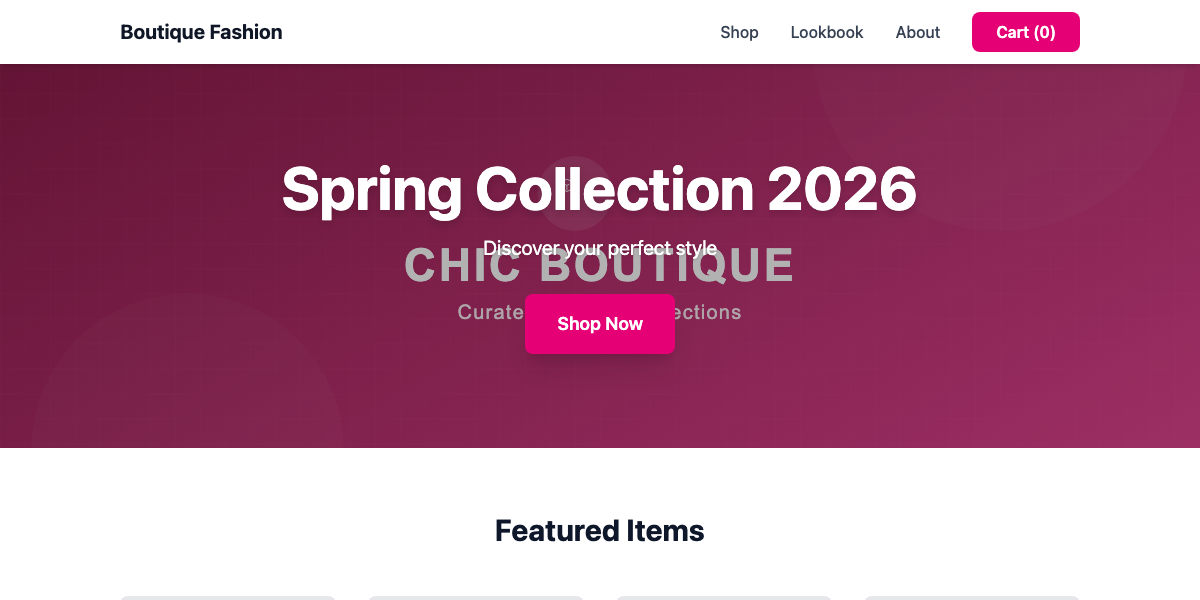 Live demo hero section showcasing the design and layout
Why React SPA for Fashion E-Commerce?
For online fashion stores, the shopping experience matters as much as the products. Customers expect:
- Instant page transitions - No loading screens between product categories
- Smooth animations - Hover effects, image zooms, cart updates
- Interactive filtering - Sort by price, size, color without page reloads
- Shopping cart state - Persistent cart that updates in real-time
- Mobile-first design - Most fashion shoppers browse on Instagram, then buy on mobile
React SPAs deliver app-like experiences that keep shoppers engaged and reduce cart abandonment.
The Performance Numbers
JavaScript: 220KB (gzipped: 70KB)
CSS: 15KB (gzipped: 4KB)
Total Bundle: 235KB (gzipped: 74KB)

Build Time: 477ms
Status: 22% under our 300KB target
For comparison, Shopify fashion stores typically load 600KB-1.2MB of assets, and WooCommerce sites often exceed 1.5MB.
Pink Gradient Luxury: E-Commerce Design
Fashion brands need websites that reflect their style. We designed a modern, luxurious color palette:
Primary Colors:
- Pink (#ec4899) - feminine, luxury, fashion-forward
- Deep Pink (#db2777) - passion, excitement
- Light Pink (#f472b6) - soft accents, highlights
Why pink?
Pink evokes femininity, luxury, and youthfulness–perfect for a boutique fashion brand targeting 18-35 year old women. Think Glossier, Victoria’s Secret Pink, or independent Australian fashion labels.
Hero gradient: Pink-500 to Purple-600 creates depth and visual interest without overwhelming product imagery.
Typography:
- Headings: Plus Jakarta Sans (modern, fashion-forward)
- Body: Inter (clean, readable product descriptions)
The same professional fonts ensure consistency across all touchpoints.
Product Showcase That Sells
Homepage Layout
The homepage is designed to convert browsers into buyers:
1. Hero Section with CTA
Boutique Fashion Store
Curated collections for the modern woman
The hero uses a vibrant pink-to-purple gradient that immediately establishes the brand aesthetic. The “Shop Now” button is prominently placed with hover effects that invite interaction.
2. Featured Products Grid
Below the hero, a 4-product grid showcases:
- Silk Evening Dress - $189
- Cashmere Sweater - $129
- Leather Ankle Boots - $249
- Designer Handbag - $329
Each product card includes:
- High-quality product image (SVG placeholder in demo)
- Product name and category
- Price with clear typography
- “Add to Cart” button with hover state
- Smooth hover effect (card lifts slightly, shadow deepens)
Mobile optimization: The grid collapses to 2 columns on tablets, 1 column on phones, ensuring product images stay large and tappable.
Product Card Component
The ProductCard component is a reusable React component:
interface ProductCardProps {
  name: string;
  price: number;
  image: string;
  category: string;
}
This makes adding products simple–just pass the props. For a live store, we’d connect this to your product database or Shopify API.
Hover interactions:
- Card lifts 4px with smooth transition
- Shadow expands for depth effect
- “Add to Cart” button changes color
- Cursor becomes pointer
These micro-interactions make the experience feel premium and responsive.
Shopping Cart Button
The navigation includes a shopping cart icon with badge (showing number of items). In a live site, this would:
- Open a slide-out cart panel
- Show all cart items with images
- Display total price
- Offer “Checkout” button
- Update in real-time when items are added
React 19 + Vite: Modern Development
Why Vite?
Vite is the modern build tool replacing Create React App. Benefits:
- Lightning-fast dev server - Starts in < 1 second
- Instant hot reload - See changes without full page refresh
- Optimized production builds - Automatic code splitting
- Native ESM - Modern JavaScript without bundler overhead
The development experience is dramatically better than traditional webpack setups.
React 19 Features
This demo uses React 19’s latest capabilities:
1. React Router v6
Client-side routing for instant page transitions:
<Routes>
  <Route path="/" element={<Home />} />
  <Route path="/shop" element={<Shop />} />
  <Route path="/about" element={<About />} />
  <Route path="/contact" element={<Contact />} />
</Routes>
When users click navigation links, React swaps components instantly–no page reload, no loading spinner.
2. useState for Cart Management
const [cart, setCart] = useState([]);

function addToCart(product) {
  setCart([...cart, product]);
}
React’s state management keeps the cart synchronized across all components. When you add an item, the cart badge updates immediately.
3. Component Composition
The entire site is built from reusable components:
<Navigation />- Header with cart<ProductCard />- Individual product display<Footer />- Site footer with links
This makes maintenance simple–update the Navigation component once, and every page gets the change.
Tailwind CSS v4 Integration
Tailwind v4 brings major improvements:
New features:
- CSS-based configuration (no more JavaScript config)
- @tailwindcss/vite plugin (faster builds)
- Smaller CSS output (better tree-shaking)
The final CSS bundle is just 15KB (4KB gzipped)–incredibly small for a full e-commerce design.
Example utility classes:
<button className="bg-primary-500 hover:bg-primary-600
  text-white px-6 py-3 rounded-lg transition-colors
  duration-200 font-semibold">
  Add to Cart
</button>
No custom CSS needed–compose styles from utilities.
Mobile Shopping Experience
73% of fashion e-commerce traffic comes from mobile devices. Women especially browse Instagram fashion content, then shop on their phones.
Mobile optimizations:
- Touch-friendly product cards - Large tap targets (minimum 48px)
- Responsive product grid - Adapts to any screen size
- Mobile navigation - Hamburger menu with smooth slide-in
- Fast loading - 74KB gzipped loads quickly on 4G/5G
- Thumb-zone CTAs - “Add to Cart” buttons in easy reach
The mobile menu uses React state management to open/close smoothly:
const [mobileMenuOpen, setMobileMenuOpen] = useState(false);Clicking the hamburger toggles the menu with smooth animation.
What’s Missing (That You’d Add for a Live Store)
This demo showcases the frontend foundation, but a real fashion e-commerce site needs:
1. Product Detail Pages
Individual pages for each product with:
- Multiple product images (carousel/gallery)
- Size selector (XS, S, M, L, XL)
- Color variations with visual swatches
- Detailed product description
- Size guide
- Customer reviews
- Related products
2. Shopping Cart Functionality
Full cart system with:
- Add/remove items
- Quantity adjustment
- Size/color selection
- Cart total calculation
- Promo code input
- “Proceed to Checkout” button
3. Checkout Flow
Multi-step checkout:
- Shipping address form
- Delivery method selection
- Payment integration (Stripe, PayPal)
- Order confirmation page
- Email receipts
4. Product Filtering & Search
E-commerce essentials:
- Filter by category (Dresses, Tops, Bottoms, Accessories)
- Filter by size, color, price range
- Sort by newest, price (low/high), popularity
- Search bar with autocomplete
5. User Accounts
Customer account features:
- Login/signup
- Order history
- Saved addresses
- Wishlist/favorites
- Newsletter preferences
6. Inventory Management
Backend integration:
- Real-time stock levels
- “Out of Stock” indicators
- Low stock warnings
- Automated restock notifications
7. Professional Photography
Replace SVG placeholders with:
- Professional model photography
- Multiple angles per product
- Lifestyle shots (products in use)
- Detail shots (fabric, stitching, zippers)
Photography investment: $1,500-3,000 for 20-30 products (models, styling, editing).
E-Commerce Platform Integration
For a live store, we’d integrate with:
Option 1: Shopify Headless
Use Shopify for product/order management, React for frontend:
Pros:
- Shopify handles payments, inventory, shipping
- React provides custom design and UX
- Best of both worlds
Cons:
- Shopify monthly fees ($39-399)
- More complex setup
Option 2: Custom with Stripe
Build custom backend with Stripe for payments:
Pros:
- Full design control
- No platform fees (just Stripe 1.75% + $0.30)
- Custom features possible
Cons:
- More development work
- You handle inventory management
Option 3: WooCommerce Headless
Use WordPress/WooCommerce backend, React frontend:
Pros:
- Free platform (no monthly fees)
- Familiar admin interface
- Large plugin ecosystem
Cons:
- WordPress hosting complexity
- Slower than modern alternatives
Our recommendation: Shopify Headless for most fashion brands. You get enterprise-grade checkout, inventory, and shipping, while maintaining a custom React frontend.
SEO for Fashion E-Commerce
React SPAs have historically struggled with SEO (search engines need HTML, not JavaScript). Solutions:
1. Server-Side Rendering (SSR)
Upgrade to Next.js or Remix for SSR:
- Server generates HTML for search engines
- React handles interactivity after load
- Best SEO performance
2. Pre-rendering
Use services like Prerender.io or Netlify:
- Generate static HTML snapshots
- Serve to search engine bots
- Serve SPA to real users
3. Static Generation
For small catalogs (fewer than 100 products), build static HTML:
- Vite can generate HTML at build time
- Fast, SEO-friendly
- Requires rebuild to update products
For most fashion stores: Start with the SPA, add SSR when you have 50+ products and need advanced SEO.
Hosting & Deployment
React SPAs are simple to host:
Cloudflare Pages (recommended):
- Free hosting
- Global CDN (fast worldwide)
- Automatic deployments from GitHub
- SSL included
- Custom domain support
Vercel:
- Free for personal sites
- $20/month for commercial
- Excellent DX (developer experience)
- Automatic HTTPS
Netlify:
- Similar to Cloudflare Pages
- Free tier available
- Great for SPAs
Monthly hosting cost: $0-20 (versus $50-200 for WordPress WooCommerce hosting).
Real Fashion E-Commerce Pricing
Interested in a custom fashion e-commerce site for your Sydney brand?
Starter Package (Demo + Product Pages):
- Homepage with featured products
- Product listing page with filtering
- Individual product detail pages
- Shopping cart functionality
- Contact page
- Investment: $6,500 - $9,500
Full E-Commerce Package:
- Everything in Starter
- Full checkout flow with Stripe/PayPal
- Customer accounts (login, order history)
- Admin dashboard for product management
- Email notifications
- Investment: $12,000 - $18,000
Shopify Headless Package:
- Custom React frontend (like this demo)
- Shopify backend integration
- Product sync, inventory management
- Shopify checkout
- Investment: $8,000 - $12,000
Ongoing costs:
- Hosting: $0-20/month
- Shopify: $39-399/month (if using Shopify)
- Stripe fees: 1.75% + $0.30 per transaction
- Photography: $1,500-3,000 one-time
Timeline: 6-10 weeks from design to launch.
View the Live Demo
Experience the Boutique Fashion Store demo:
boutique-fashion.cosmoswebtech.com.au →
Try the features:
- Hover over product cards to see smooth animations
- Click “Add to Cart” buttons
- Test mobile responsive design (resize browser or use phone)
- Notice the instant page feel (no loading screens)
See how the pink gradient creates a luxury fashion aesthetic.
Ready to launch your fashion e-commerce store? Contact Cosmos Web Tech for a free consultation about building a beautiful, high-converting online store for your Sydney brand.
📞 0433 309 677 📧 Email us 🏢 Bella Vista, Western Sydney
We build e-commerce sites that look amazing and drive sales–just like this Boutique Fashion demo.
Modern retail runs on connected POS, inventory, and online channels. Cloud Geeks provides cloud and IT support that keeps Australian retail and hospitality businesses online during peak hours.
Ash Ganda covers digital strategy for retail and hospitality SMBs — what to automate, what to outsource, and where AI actually moves revenue.
Loyalty apps, mobile ordering, and customer-facing apps drive repeat business. Awesome Apps builds them for Australian retail and hospitality brands.
Part of the Ganda Tech Services family, Cosmos Web Tech delivers specialist web design and digital marketing for Australian small and medium businesses.