Creating Effective Facebook Ad Campaigns for Local Business
Facebook advertising remains one of the most cost-effective ways for local businesses to reach customers in their area. With detailed targeting options, flexible budgets, and a huge Australian user base, Facebook Ads can deliver real results for businesses of all sizes.
But throwing money at Facebook without a strategy is a sure way to waste your budget. Here is a practical guide to creating Facebook ad campaigns that actually work for local businesses.
Why Facebook Ads Work for Local Business
Precise Geographic Targeting
Facebook lets you target people based on their location, down to a specific radius around your business address. For a Western Sydney business, you can show your ads only to people within 10, 20, or 30 kilometres of your location. No wasted spend on people outside your service area.
Detailed Audience Targeting
Beyond location, you can target based on age, gender, interests, behaviours, job titles, and more. A children’s party entertainer can target parents of young children in their area. A business accountant can target small business owners.
Flexible Budgets
You can run Facebook Ads with almost any budget. Many local businesses see results with as little as $10 to $20 AUD per day. You have full control over your spending and can pause or adjust your campaigns at any time.
Multiple Ad Formats
Facebook offers various ad formats including image ads, video ads, carousel ads (multiple images in a swipeable format), and lead ads (which collect customer information directly within Facebook). This gives you flexibility to present your business in the most effective way.
Setting Up Your Campaign
Step 1: Access Meta Ads Manager
While you can “boost” posts directly from your Facebook page, Ads Manager gives you far more control and better results. Access it at business.facebook.com or through the Meta Business Suite.
If you have not set up a Meta Business account, create one first. It is free and gives you access to all of Facebook’s advertising tools.
Step 2: Choose Your Campaign Objective
Facebook offers several campaign objectives. For local businesses, the most relevant are:
- Leads: Collect customer enquiries directly through Facebook. The lead form appears within Facebook, so users do not need to visit your website. Great for service businesses.
- Traffic: Send people to your website. Good if you have a strong website with clear calls to action.
- Awareness: Show your ad to as many people as possible. Best for brand building and announcing your business to the local area.
- Engagement: Get more likes, comments, and shares on your posts. Useful for building social proof and community.
- Sales: Drive purchases on your website. Best for e-commerce businesses.
For most local service businesses, Leads or Traffic are the best starting points.
Step 3: Define Your Audience
This is where Facebook Ads really shine for local businesses.
Location: Set your target area. Options include:
- A specific suburb or postcode
- A radius around a specific address (your business location)
- Multiple locations if you serve several areas
For a business in Western Sydney, you might target a 20-kilometre radius around your business address, or select specific suburbs like Parramatta, Blacktown, Penrith, Liverpool, and the Hills District.
Age and Gender: Narrow based on your typical customer profile. A wedding photographer might target women aged 25 to 40. A retirement planning advisor might target people aged 50 to 65.
Interests and Behaviours: Target people based on their interests, hobbies, and online behaviour. A fitness studio might target people interested in fitness, yoga, and healthy living. A home renovation business might target homeowners interested in home improvement.
Custom Audiences: Upload your existing customer email list to create a Custom Audience. Facebook matches your list against its users and lets you target (or exclude) those people. You can also create Lookalike Audiences, which are people who are similar to your existing customers.
Step 4: Set Your Budget and Schedule
Daily budget: The amount you are willing to spend each day. Start with $15 to $30 AUD per day and adjust based on results.
Lifetime budget: The total amount you want to spend over the campaign’s duration. Facebook will distribute this across your scheduled dates.
Schedule: Run your ads continuously or set specific start and end dates. For ongoing lead generation, continuous is usually best. For event promotions or limited offers, set specific dates.
Step 5: Create Your Ad
Choosing Your Format
- Single image: Simple and effective. Works well for most objectives.
- Video: Highly engaging. Even a simple 15-second video can outperform a static image.
- Carousel: Shows multiple images that users can swipe through. Great for showcasing multiple products, services, or features.
Writing Your Ad Copy
Primary text (the main text above the image):
- Lead with a benefit or pain point that resonates with your audience
- Keep it concise. Two to three sentences for the main point, with optional additional detail.
- Include a clear call to action
Headline (below the image):
- Short and direct. Tell people what you are offering.
- Examples: “Free Quote Today,” “Book Your Appointment,” “Shop Now and Save 20%”
Description (optional text below the headline):
- Add supporting details or urgency
Ad Copy Examples for Local Business
For a plumber: Primary text: “Dealing with a blocked drain or leaking tap? Our licensed plumbers are available across Western Sydney for fast, reliable service. Call today for a free, no-obligation quote.” Headline: “Same-Day Plumbing Service” CTA button: “Call Now”
For a cafe: Primary text: “Start your morning right at [Cafe Name] in Parramatta. Freshly roasted coffee, house-made pastries, and all-day brunch. Open 7 days.” Headline: “Your New Favourite Cafe” CTA button: “Get Directions”
For a real estate agent: Primary text: “Thinking about selling your home in the Hills District? Find out what your property is worth with a free market appraisal from our experienced local team.” Headline: “Free Property Appraisal” CTA button: “Learn More”
Image and Video Tips
- Use authentic photos of your business, team, and work rather than stock photos
- Feature people when possible (faces get more engagement)
- Keep text on images to a minimum (Facebook used to limit text on ad images; while the strict rule has relaxed, less text still performs better)
- For video, capture attention in the first three seconds and keep the total length under 30 seconds for most ad types
- Ensure your creative looks good on mobile (most Facebook users are on mobile)
Measuring Your Results
Key Metrics to Track
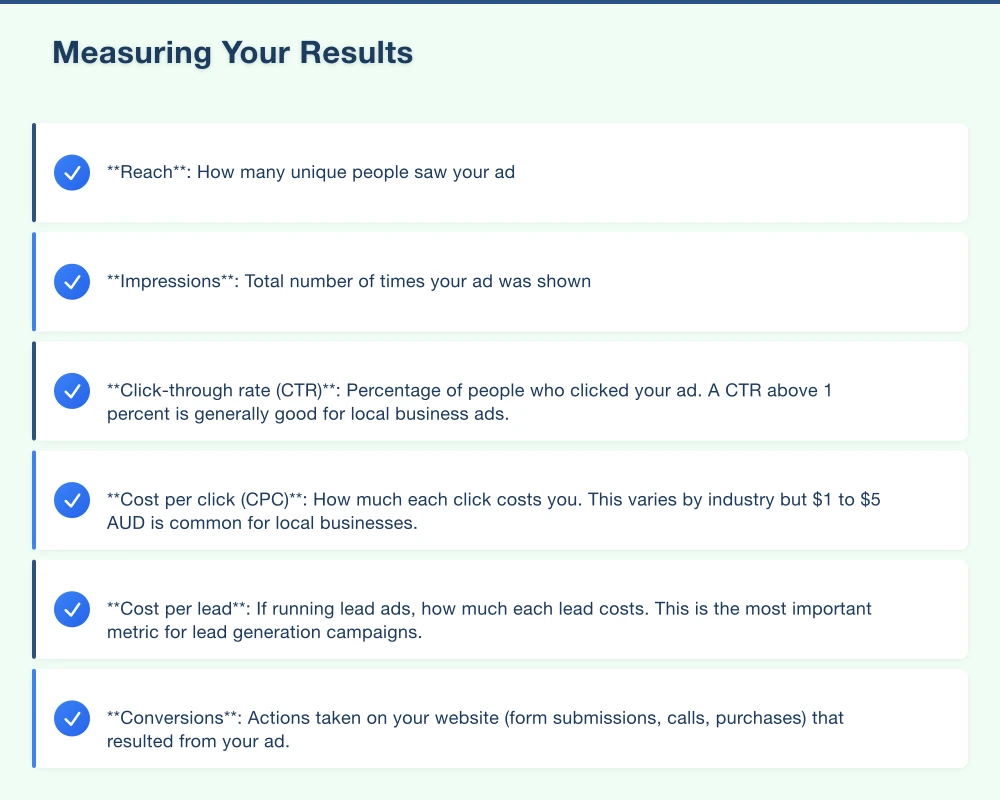
- Reach: How many unique people saw your ad
- Impressions: Total number of times your ad was shown
- Click-through rate (CTR): Percentage of people who clicked your ad. A CTR above 1 percent is generally good for local business ads.
- Cost per click (CPC): How much each click costs you. This varies by industry but $1 to $5 AUD is common for local businesses.
- Cost per lead: If running lead ads, how much each lead costs. This is the most important metric for lead generation campaigns.
- Conversions: Actions taken on your website (form submissions, calls, purchases) that resulted from your ad.
Setting Up Conversion Tracking
Install the Meta Pixel on your website to track what happens after someone clicks your ad. The Pixel lets you see how many ad clicks led to enquiries, purchases, or other valuable actions.
Without the Pixel, you only know how many people clicked your ad. With it, you know how many became actual leads or customers.
Common Mistakes to Avoid
Targeting too broadly. If your audience is too large, your budget is spread thin and your ad may not reach the most relevant people. Be specific with your targeting.
No clear call to action. Every ad should tell people what to do next. “Call now,” “Book online,” “Get a free quote,” or “Visit us today” are clear next steps.
Using poor quality images. A blurry, dark, or unappealing image will not get clicks regardless of how good your ad copy is. Invest time in quality visuals.
Setting and forgetting. Facebook Ads need monitoring and adjustment. Check your campaigns at least weekly. Pause underperforming ads and put more budget behind winners.
Not testing variations. Create multiple versions of your ad with different images, headlines, and text. Facebook will automatically show the best-performing version more often.
Start Small, Learn, and Scale
You do not need a big budget to get started with Facebook Ads. Begin with $15 to $20 per day, run your ads for two weeks, and evaluate the results. If they are positive, increase your budget. If not, adjust your targeting, creative, or offer and try again.
If you need help setting up and managing Facebook ad campaigns for your local business, Cosmo Web Tech works with businesses across Western Sydney to create advertising strategies that deliver measurable results. Get in touch to discuss how we can help.
Your website’s performance depends on what’s behind it. Cloud Geeks provides the managed hosting, cloud, and IT support that keeps Australian SMBs online and secure.
Ash Ganda covers how Australian SMBs are using AI, automation, and digital strategy to grow without scaling costs proportionally.
If your business is also planning a customer-facing iOS or Android app — Awesome Apps builds cross-platform mobile apps for Australian SMBs.
Part of the Ganda Tech Services family, Cosmos Web Tech delivers specialist web design and digital marketing for Australian small and medium businesses.