Introduction
Email marketing consistently delivers one of the highest returns on investment of any marketing channel. For small businesses, it offers direct communication with customers who’ve actively chosen to hear from you–no algorithm deciding whether your message gets seen.
Mailchimp remains the most popular email marketing platform for small businesses, offering a free tier generous enough for many businesses and intuitive tools that don’t require technical expertise. This guide covers how to use Mailchimp effectively, from building your list to creating campaigns that drive results.
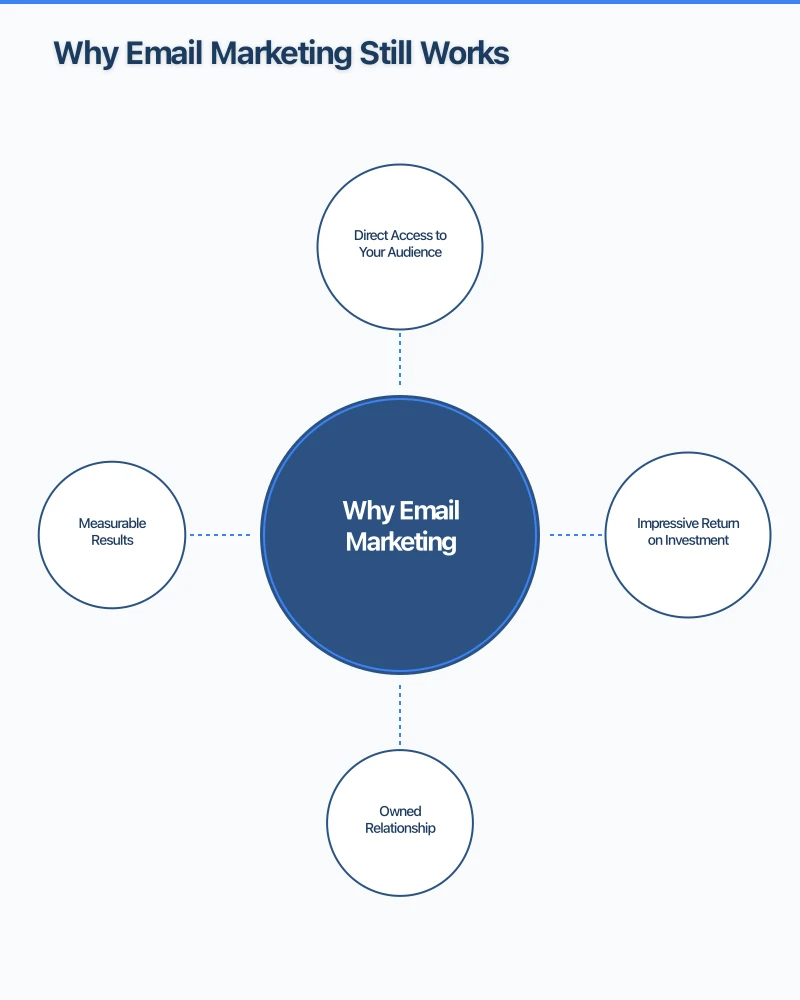
Why Email Marketing Still Works
Direct Access to Your Audience
Unlike social media where platforms control who sees your content, email delivers directly to inboxes. Your message doesn’t compete with an algorithm–it reaches everyone on your list.
Impressive Return on Investment
Email marketing averages $36-42 return for every $1 spent. Few marketing channels match this efficiency, particularly for small businesses with limited budgets.
Owned Relationship
Your email list belongs to you. If a social platform changes its rules or disappears, your email subscribers remain accessible. This ownership makes email marketing a foundation for long-term customer relationships.
Measurable Results
Email provides clear metrics: open rates, click rates, conversions. You can see exactly what’s working and adjust accordingly.
Getting Started with Mailchimp
Creating Your Account
- Visit mailchimp.com and click “Sign Up Free”
- Enter your email, username, and password
- Confirm your email address
- Complete your profile with business details
Important settings:
- Add your physical business address (required by anti-spam laws)
- Set your default “from” name and email
- Configure timezone to Australian Eastern Time
Understanding Mailchimp’s Structure
Audiences: Your email lists. Most small businesses need only one audience.
Campaigns: Individual emails you send–newsletters, promotions, announcements.
Automations: Triggered email sequences–welcome series, birthday emails, abandoned cart.
Templates: Pre-designed email layouts you can customize.
Free vs Paid Plans
Free plan includes:
- Up to 500 contacts
- 1,000 emails per month
- Basic templates and automation
- Marketing CRM features
Paid plans add:
- More contacts and sending volume
- Advanced automation
- A/B testing
- Send time optimization
- Priority support
Most small businesses can start on the free plan and upgrade as their list grows.
Building Your Email List
Your list is your most valuable email marketing asset. Building it ethically and effectively takes time but pays dividends.
List Building Best Practices
Permission-based only: Only email people who’ve explicitly opted in. Buying lists damages your reputation and violates anti-spam laws.
Clear expectations: Tell subscribers what they’ll receive and how often.
Make it valuable: Give people a reason to subscribe beyond “join our newsletter.”
Single opt-in vs double opt-in: Double opt-in (confirmation email) creates cleaner lists but adds friction. For small businesses, single opt-in usually works fine.
Where to Collect Subscribers
Your website:
- Pop-up or slide-in forms (use thoughtfully–not immediately on arrival)
- Embedded forms on key pages
- Footer signup
- Exit-intent popups
At your business:
- In-store signup (tablet or paper form)
- Point of sale
- Business cards with signup URL
- QR codes linking to signup
Social media:
- Link in bio to signup page
- Occasional posts promoting signup
- Facebook page signup button
Other touchpoints:
- Email signature
- Order confirmations (checkbox for marketing)
- Events and networking
Signup Incentives That Work
Give people a reason to subscribe:
Discount or offer: “10% off your first order” Useful content: “Free guide to [relevant topic]” Exclusive access: “Subscriber-only sales” Local value: “Monthly Western Sydney business tips”
Match the incentive to your business and audience.
Creating Signup Forms in Mailchimp
- Go to Audience > Signup forms
- Choose form type (embedded, popup, landing page)
- Customize fields (name, email, preferences)
- Design to match your brand
- Generate code to add to your website
Keep forms simple–every additional field reduces signups.
Designing Effective Emails
Good email design balances aesthetics with function across all devices.
Choosing a Template
Mailchimp provides templates for various purposes:
Simple layouts: Clean, focused, professional Newsletter layouts: Multiple content sections Promotional layouts: Feature products or offers Announcement layouts: Single message focus
Start with a template close to your needs and customize from there.
Email Design Best Practices
Mobile-first: Most emails open on phones. Design for small screens first.
Single column: Easier to read on mobile, loads faster.
Clear hierarchy: Most important content at top, logical flow downward.
Readable text: Minimum 14px font size, adequate line spacing.
Clickable buttons: Large enough to tap on mobile (44x44 pixels minimum).
Alt text for images: Describes images when they don’t load.
The Structure of an Effective Email
Preheader text: The preview text shown in inbox–use it to complement your subject line.
Header: Logo, navigation links (optional).
Hero section: Main message or image–immediately captures attention.
Body content: Your actual message–keep focused on one main topic or offer.
Call to action: Clear, prominent button telling readers what to do next.
Footer: Contact info, unsubscribe link, physical address (required).
Writing Email Copy That Converts
Subject lines:
- Keep under 50 characters (displays fully on mobile)
- Create curiosity or urgency
- Be specific about content
- Test different approaches
Body copy:
- Write conversationally, as if to one person
- Get to the point quickly
- Use short paragraphs and bullet points
- Focus on benefits, not just features
- Include only one primary call to action
Examples of strong subject lines:
- “3 ways to [achieve benefit]”
- “[Subscriber name], your exclusive offer inside”
- “This weekend only: [specific offer]”
- “The mistake most [audience] make”
Setting Up Automation
Email automation sends targeted messages based on triggers and timing, working while you sleep.
Welcome Sequence
The most important automation for any business.
Email 1 (Immediate): Thank them for subscribing, deliver promised incentive, introduce your business.
Email 2 (Day 2-3): Share your story, what makes you different, customer testimonials.
Email 3 (Day 5-7): Helpful content related to your expertise.
Email 4 (Day 7-10): Soft call to action–visit, book, shop.
Setting this up in Mailchimp:
- Go to Automations > Create Automation
- Choose “Welcome new subscribers”
- Build your email sequence
- Set timing between emails
- Activate the automation
Other Valuable Automations
Birthday/anniversary emails: Personal touch, often good for offers.
Re-engagement: Email inactive subscribers before removing them.
Post-purchase: Thank customers, request reviews, suggest related products.
Abandoned cart (e-commerce): Remind customers about items left behind.
Automation Best Practices
- Start simple (welcome sequence first)
- Test thoroughly before activating
- Monitor performance and adjust
- Don’t over-automate–maintain personal touch
- Regularly review and update content
Sending Campaigns
Beyond automation, regular campaigns maintain subscriber engagement.
Types of Campaigns
Newsletters: Regular updates, valuable content, company news.
Promotional: Sales, special offers, new products/services.
Announcement: Important news, events, updates.
Seasonal: Holiday-related, timely content.
How Often to Email
There’s no universal answer, but guidelines:
Minimum: Monthly (less frequent and subscribers forget you) Maximum: What you can sustain with quality content Sweet spot for most: Every 2-4 weeks
Consistency matters more than frequency. Weekly is great if you can maintain it; monthly is fine if that’s sustainable.
Best Time to Send
General guidelines:
- Tuesday, Wednesday, Thursday typically perform best
- Mid-morning (10am-11am) or early afternoon (1pm-3pm)
- Avoid Monday mornings and Friday afternoons
Better approach: Use Mailchimp’s send time optimization (paid plans) or test different times with your audience.
Creating a Campaign in Mailchimp
- Go to Campaigns > Create Campaign > Email
- Select your audience and segment
- Add subject line and preheader
- Choose template and customize design
- Write your content
- Preview on desktop and mobile
- Send test email to yourself
- Schedule or send immediately
Segmentation and Personalization
Sending relevant content to the right people improves results dramatically.
Basic Segmentation
Divide your list based on:
Demographics: Location, age (if known).
Engagement: Active vs inactive subscribers.
Behavior: What they’ve clicked, purchased, downloaded.
Preferences: What topics or products interest them.
Source: How they joined your list.
Segmentation in Mailchimp
- Go to Audience > Segments > Create Segment
- Set conditions (e.g., “subscribed in last 30 days”)
- Save segment for use in campaigns
Personalization Options
Basic: Use first name in subject line or greeting.
Advanced: Content blocks shown only to certain segments.
Dynamic: Product recommendations based on behavior.
Start with basic personalization and add complexity as you learn what works.
Measuring Email Performance
Key Metrics to Track
Open rate: Percentage who opened your email.
- Average: 15-25% varies by industry
- Affected by subject lines, sender reputation, timing
Click rate: Percentage who clicked a link.
- Average: 2-5%
- Indicates content relevance and call-to-action effectiveness
Unsubscribe rate: Percentage who unsubscribed.
- Normal: Under 0.5% per email
- Higher suggests content mismatch or over-emailing
Bounce rate: Emails that couldn’t be delivered.
- Soft bounces: Temporary issues
- Hard bounces: Invalid addresses (remove these)
Analyzing Campaign Performance
After each campaign, check:
- How did open rate compare to your average?
- Which links got the most clicks?
- Did anyone unsubscribe? Why might that be?
- What can you learn for next time?
A/B Testing
Test one variable at a time:
Subject lines: Send two versions to a portion of your list, winner goes to the rest.
Send time: Test different days or times.
Content: Test different approaches to the same message.
Mailchimp’s A/B testing (paid plans) makes this straightforward.
Maintaining List Health
A clean, engaged list performs better than a large, inactive one.
Regular Maintenance
Remove hard bounces: Mailchimp does this automatically, but verify.
Clean inactive subscribers: Those who haven’t opened in 6-12 months–either re-engage or remove.
Update segments: Keep segments current with subscriber behavior.
Re-engagement Campaigns
Before removing inactive subscribers:
- Send a “We miss you” email
- Offer incentive to re-engage
- Ask if they still want to receive emails
- Remove those who don’t respond
Handling Unsubscribes
Unsubscribes aren’t failures–they’re natural list maintenance.
- Make unsubscribing easy (it’s required by law anyway)
- Don’t take it personally
- Consider exit surveys to understand why
- Focus on engaging those who remain
Australian Anti-Spam Compliance
Email marketing in Australia must comply with the Spam Act 2003.
Requirements
Consent: Only email people who’ve agreed to receive marketing.
Identification: Clearly identify yourself as the sender.
Unsubscribe: Include functional unsubscribe in every email.
Physical address: Include your business address.
Honor opt-outs: Process unsubscribes within 5 business days.
Mailchimp helps with compliance by requiring these elements, but ultimate responsibility is yours.
Getting Started: Your First Month
Week 1: Setup
- Create Mailchimp account
- Configure settings and branding
- Create signup form
- Add signup to website
Week 2: Welcome Sequence
- Write 3-4 welcome emails
- Set up welcome automation
- Test the sequence yourself
- Activate automation
Week 3: First Campaign
- Plan your first newsletter
- Create content and design
- Test thoroughly
- Send to your list
Week 4: Optimize
- Review welcome sequence performance
- Analyze first campaign results
- Adjust based on learnings
- Plan ongoing content calendar
Taking Your Email Marketing Further
Once you’ve mastered the basics:
Advanced automation: Multi-step sequences based on behavior.
Integration: Connect Mailchimp to your website, CRM, or e-commerce.
Advanced segmentation: More sophisticated targeting based on multiple criteria.
Landing pages: Mailchimp’s landing page builder for campaigns.
At Cosmos Web Technologies, we help Western Sydney businesses develop effective email marketing strategies. Whether you need complete email marketing management or help getting started with Mailchimp, we’re here to help you connect with your customers.
Ready to start email marketing? Contact us for a free consultation on building your email strategy.
Your website’s performance depends on what’s behind it. Cloud Geeks provides the managed hosting, cloud, and IT support that keeps Australian SMBs online and secure.
Ash Ganda covers how Australian SMBs are using AI, automation, and digital strategy to grow without scaling costs proportionally.
If your business is also planning a customer-facing iOS or Android app — Awesome Apps builds cross-platform mobile apps for Australian SMBs.
Part of the Ganda Tech Services family, Cosmos Web Tech delivers specialist web design and digital marketing for Australian small and medium businesses.