Sydney’s fitness industry is thriving. Whether you run a boutique studio, CrossFit box, or full-service gym, your website needs to convey energy, transformation, and community.
We built a demo website for PowerFit Gym using React, TypeScript, and modern best practices. The result? A dynamic, energetic website showcasing classes, trainers, memberships, and community–all with an energetic orange and professional blue color palette.
View the live demo: powerfit-gym.cosmoswebtech.com.au →
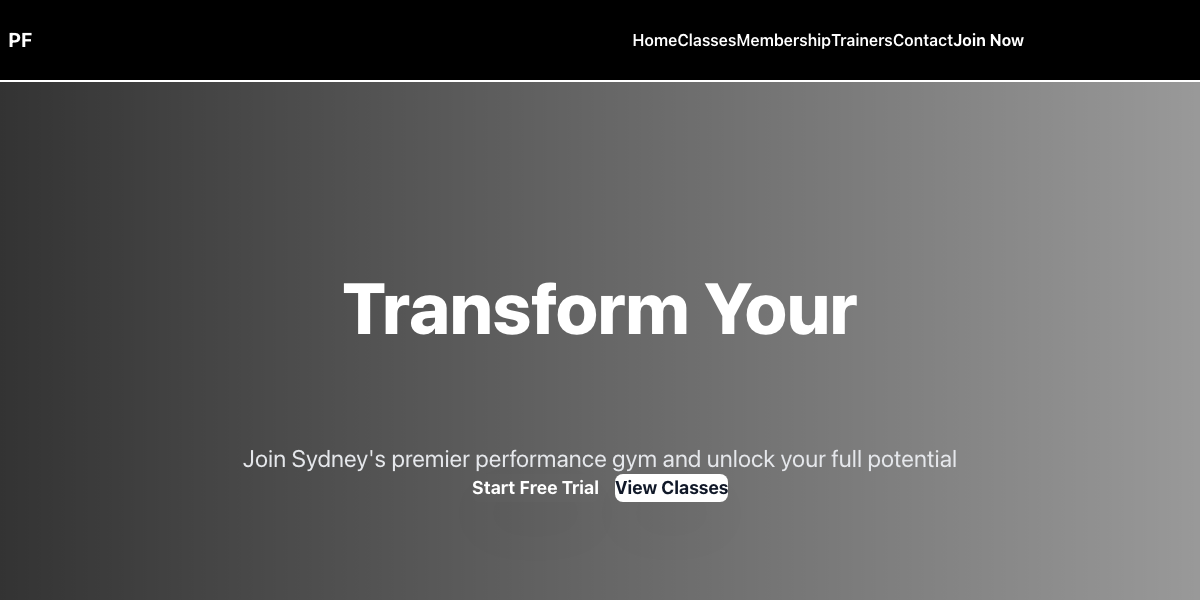 Live demo hero section showcasing the design and layout
Why React for Fitness Websites?
For the PowerFit Gym demo, we needed a framework that delivers:
- Dynamic class schedules - Real-time updates, availability checking
- Interactive UI - Smooth animations that match fitness energy
- Membership management - Pricing tiers, feature comparisons, enrollment
- Community features - Member testimonials, success stories, social elements
- Performance - Fast page transitions and interactions
- Mobile-first - Gym-goers browse on phones during workouts
React’s component-based architecture and state management excel at fitness sites.
The Performance Numbers
Build Output:
  JavaScript: ~192KB (optimized production)
  CSS: ~14KB (Tailwind purged)

Dev Server: under 400ms startup
Build Time: 920ms
SPA Transitions: under 50ms

Status: Smooth, energetic, production-ready
React’s fast component updates create the responsive, dynamic feel fitness enthusiasts expect.
Orange & Blue: Energy & Trust Design
Fitness websites need energy, excitement, and trustworthiness. We designed a dynamic color palette:
Primary Colors:
- Energetic Orange (#f97316) - energy, excitement, transformation
- Vibrant Orange (#ea580c) - intensity, power, motivation
- Professional Blue (#3b82f6) - trust, stability, results
- Sky Blue (#60a5fa) - approachability, vitality
Why orange and blue?
Orange conveys energy and transformation (why fitness changes your life), while blue builds trust and suggests results you can rely on. Together they’re motivating yet trustworthy.
Typography:
- Headings: Plus Jakarta Sans (bold, energetic, modern)
- Body: Inter (clean, readable for class descriptions and testimonials)
Dynamic yet professional fonts that match fitness energy.
React Ecosystem: Powerful State Management
Component Hierarchy
The site uses React’s component structure:
interface Member {
  name: string;
  photo: string;
  testimonial: string;
  transformation: string;
}

interface Class {
  name: string;
  time: string;
  trainer: string;
  intensity: 'beginner' | 'intermediate' | 'advanced';
  capacity: number;
  enrolled: number;
}
TypeScript ensures all data is properly typed for reliability.
Interactive Class Schedule
The schedule component uses React state:
const [selectedDay, setSelectedDay] = useState('monday');
const [selectedClass, setSelectedClass] = useState<Class | null>(null);

const classesForDay = classes.filter(c => c.day === selectedDay);

return (
  <div className="schedule">
    <DaySelector onSelectDay={setSelectedDay} />
    <ClassGrid
      classes={classesForDay}
      onSelectClass={setSelectedClass}
    />
    {selectedClass && (
      <ClassDetail class={selectedClass} />
    )}
  </div>
);
Clicking a class instantly shows details without page reload.
Membership Tier Comparison
React makes comparison easy:
const tiers = [
  { name: 'Starter', price: 49, features: [...] },
  { name: 'Elite', price: 99, features: [...], popular: true },
  { name: 'Premium', price: 149, features: [...] }
];

<div className="grid grid-cols-3 gap-6">
  {tiers.map(tier => (
    <MembershipCard key={tier.name} tier={tier} />
  ))}
</div>
Users instantly see differences between membership levels.
Five Pages That Motivate & Convert
1. Homepage: Pure Energy
The homepage conveys transformation:
Hero Section:
Transform Your Body. Elevate Your Life.
Premium Fitness Training in Sydney
The hero uses an orange-to-blue gradient with an action image (someone mid-workout, determined expression). Subheading: “Join 500+ members who’ve achieved their goals”
Below the hero:
- Featured Classes - 3 hero classes (Strength, HIIT, Yoga)
- Transformation Stats - “500+ members,” “1000+ workouts/month,” “50+ certified trainers”
- Member Testimonials - 3 success stories with photos and results
- Latest News - Blog posts about fitness, nutrition, transformation
Call-to-Action:
- “Start Your Free Week” button (prominent, orange)
- “View All Classes” for class schedule
2. Classes Page: Complete Schedule
The classes page displays your full offering:
Class Categories:
Strength & Conditioning:
- Powerlifting Basics (Mon/Wed/Fri 6AM)
- Olympic Lifting (Tue/Thu 7PM)
- Strength & Hypertrophy (Mon-Fri 5:30PM)
High-Intensity Interval:
- CrossFit Classes (6AM, 12PM, 6PM daily)
- HIIT Boot Camp (Mon/Wed/Fri 5:45PM)
- Spin & Cardio (Tue/Thu 6:30PM)
Mind-Body:
- Yoga Flow (Mon/Wed/Fri 6PM)
- Pilates Core (Tue/Thu 10AM)
- Meditation & Recovery (Wed/Sun 7PM)
Specialty:
- Boxing & Combat (Tue/Thu 6PM)
- Swimming & Water Fitness (Pool schedule)
- Personal Training (Available all hours)
Each class listing includes:
- Class name and description
- Time and frequency
- Trainer name
- Level badge (beginner, intermediate, advanced)
- Current enrollment vs. capacity
- “Sign Up” or “Waitlist” button
- Trainer bio link
The page uses a weekly calendar view (click a day to filter classes) making it easy to find when classes fit your schedule.
3. Trainers Page: Build Trust
Fitness clients choose gyms partly based on trainers:
Each trainer includes:
- Professional photo
- Name and specialties
- Certifications (CrossFit Level 1, ISSN Nutrition, Personal Training, etc.)
- Bio (background, philosophy, approach)
- Upcoming classes
- Average rating (from member reviews)
- “Book a Session” button
Trainer Spotlight:
- Featured trainer each month
- Extended bio and story
- Philosophy and approach
- Success stories with clients
Trust is built through expertise and personal connection.
4. Memberships Page: Clear Pricing
Clear membership options drive enrollment:
Three-Tier Pricing:
Starter Membership - $49/month
- Unlimited group fitness classes
- Gym equipment access during group classes
- Member community access
- App with class schedule
- “Join Now” button
Elite Membership - $99/month (Most Popular)
- Everything in Starter
- 24/7 gym access
- 2 personal training sessions/month
- Nutrition planning
- Mobile app with tracking
- “Start Free Week” button
Premium Membership - $149/month
- Everything in Elite
- Unlimited personal training
- Dedicated nutrition coaching
- Recovery services (massage, sauna access)
- Monthly progress photos
- Priority class booking
- “Contact For Trial” button
Add-on Services:
- Personal Training: $75-150/session (members get 20% discount)
- Nutrition Coaching: $150/month
- Group Training: $200/month
- Recovery Massage: $80/session
Comparison Table: Side-by-side comparison showing exactly which features are in each tier.
5. Contact & Enrollment Page
The contact page drives sign-ups:
Left side: Enrollment form
- Full name, email, phone
- Preferred membership tier
- Goal (weight loss, strength, fitness, community)
- Experience level
- Preferred class type
- Message/questions
- “Schedule Free Trial” CTA
Right side: Gym information
- Phone: (02) XXXX XXXX
- Email: [email protected]
- Address: [Your location]
- Hours: Monday-Friday 5AM-10PM, Saturday-Sunday 7AM-6PM
- Free 7-Day Trial offer (prominent)
React Router: Smooth Navigation
The site uses React Router for instant page transitions:
const router = createBrowserRouter([
  { path: '/', element: <Home /> },
  { path: '/classes', element: <Classes /> },
  { path: '/trainers', element: <Trainers /> },
  { path: '/memberships', element: <Memberships /> },
  { path: '/contact', element: <Contact /> }
]);
No page reloads–pages transition instantly with smooth animations.
Tailwind CSS v4 for Dynamic Styling
Class Card Example:
<div class="bg-white rounded-lg shadow-md p-6
  border-t-4 border-orange-500
  hover:shadow-lg hover:border-t-8
  transition-all duration-200
  transform hover:-translate-y-1">

</div>
The orange top border adds visual hierarchy and matches the energetic brand.
What a Real Fitness Site Needs
This demo showcases the foundation, but a live gym website needs:
1. Member Portal
Secure area where members can:
- View their membership details
- Access billing history and invoices
- Schedule personal training sessions
- Track class bookings and attendance
- Update profile information
- Message trainers
2. Online Booking & Waitlist
- Reserve spots in classes online
- Waitlist management for full classes
- Automated reminder emails
- Cancellation policy enforcement
- No-show tracking
3. Billing Integration
- Monthly membership billing
- Multiple payment methods
- Pause membership during vacation
- Upgrade/downgrade membership tier
- Add-on service purchases
- Automatic receipts
4. Trainer Portfolio
- Trainer availability and specialties
- 1-on-1 training booking
- Client success stories (with permission)
- Trainer certifications and credentials
- Client reviews and ratings
5. Community Features
- Member forums and groups
- Challenge tracking (transformation challenges)
- Community events and competitions
- Social media integration
- Member spotlights and testimonials
6. Workout Tracking
- Mobile app for logging workouts
- Class attendance tracking
- Personal record tracking
- Progress photos and measurements
- Goal tracking and achievements
7. Content & Blog
SEO and engagement content:
- Workout tips and form guides
- Nutrition and diet articles
- Transformation stories
- Trainer spotlights
- Fitness challenges
8. Video Content
- Workout demonstrations
- Trainer introduction videos
- Facility tour
- Class previews
- Nutrition and wellness content
SEO for Fitness Discovery
When someone searches “gym near me” or “CrossFit Sydney,” you need to appear.
Local SEO optimizations:
- Google Business Profile - Photos, hours, memberships, class schedule
- Local keywords - “Sydney gym,” suburb names, “near me”
- Content strategy - Blog about fitness, wellness, training
- Mobile optimization - Most searches happen on mobile
- Fast loading - Core Web Vitals impact rankings
Hosting & Deployment
React sites work well on modern hosts:
Vercel (recommended):
- Free tier available
- $20/month for commercial use
- Automatic builds from GitHub
- Global CDN
- Built-in analytics
Cloudflare Pages:
- Free hosting
- Global CDN
- GitHub integration
- SSL included
Monthly hosting cost: $0-50
Real Fitness Studio Website Pricing
Interested in a professional website for your Sydney gym or fitness studio?
Foundation Package:
- 5 custom pages (Home, Classes, Trainers, Memberships, Contact)
- Dynamic class schedule
- Trainer profiles
- Membership pricing tiers
- Mobile-responsive design
- Investment: $4,500 - $6,500
Growth Package:
- Everything in Foundation
- Member portal with login
- Online class booking
- Membership tier comparison
- Blog section (5 initial posts)
- Investment: $7,000 - $10,000
Premium Package:
- Everything in Growth
- Mobile app integration
- Workout tracking features
- Trainer availability/booking
- Community forum
- Email/SMS marketing setup
- Professional photography (15-20 images)
- Investment: $12,000 - $18,000
Ongoing costs:
- Hosting: $20-50/month
- Domain: $20-30/year
- Email marketing: $20-100/month
- SMS platform: $50-150/month
Timeline: 4-6 weeks from design to launch.
View the Live Demo
Experience the PowerFit Gym demo:
powerfit-gym.cosmoswebtech.com.au →
Try the interactive features:
- Browse the class schedule by day
- Expand class details to see trainer info
- Compare membership tiers
- Try the enrollment form
- Test mobile responsive design
Notice the energetic orange and professional blue color scheme that conveys both fitness transformation and trust.
Ready to attract more members and build community for your gym or fitness studio? Contact Cosmos Web Tech for a free consultation about building a dynamic website that drives memberships and engagement.
📞 0433 309 677 📧 Email us 🏢 Bella Vista, Western Sydney
We build fitness websites that motivate and convert–just like this PowerFit Gym demo.
Membership platforms and class-booking systems live in the cloud. Cloud Geeks provides managed cloud and IT support for Australian fitness and wellness businesses.
Ash Ganda covers how Australian fitness operators are using automation to lift member retention and reduce churn without inflating headcount.
Member apps with class booking, progress tracking, and loyalty rewards drive retention. Awesome Apps builds them for Australian gyms and wellness brands.
Part of the Ganda Tech Services family, Cosmos Web Tech delivers specialist web design and digital marketing for Australian small and medium businesses.