Video is everywhere. Your potential customers watch YouTube tutorials, browse Instagram Reels, and scroll through TikTok daily. They’re used to learning about products, services, and businesses through video. Yet most Western Sydney small businesses still rely entirely on text and photos for their marketing.
Here’s the opportunity: while your competitors stick to static content, you can connect with local customers through video. YouTube remains the second-largest search engine in the world–yes, larger than Bing or Yahoo. When someone searches “how to fix a leaky tap” or “best cafes Parramatta,” video results increasingly appear at the top of Google.
This guide shows you how to use YouTube effectively for your local business, from setting up your channel to creating videos that attract customers–all without expensive equipment or professional video production experience.
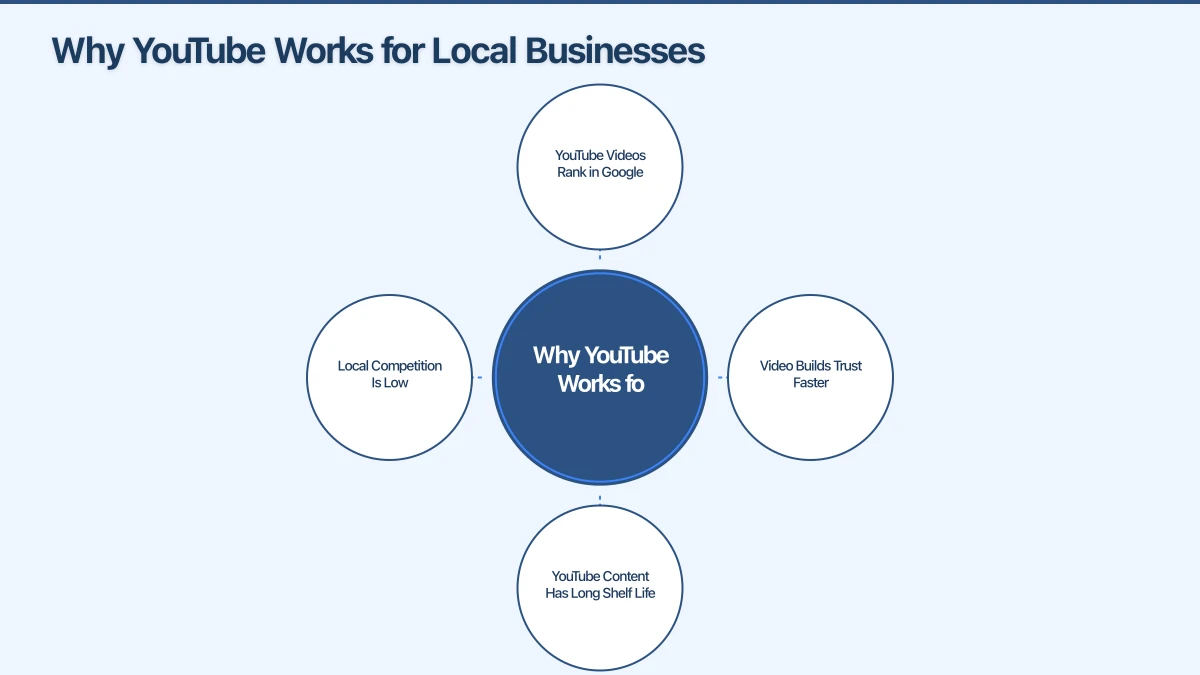
Why YouTube Works for Local Businesses
Before investing time in video, understand the specific advantages YouTube offers local businesses.
YouTube Videos Rank in Google
When you create a YouTube video optimised for a local search term, it can appear both in YouTube search results and Google search results. A video titled “Emergency Plumber Castle Hill - 24/7 Hot Water Repairs” might rank for searches a traditional website struggles to compete for.
Google increasingly shows video results for “how to” queries, product comparisons, and local service searches. This gives small businesses another path to visibility.
Video Builds Trust Faster
Potential customers want to know who they’re hiring. Reading about your business is one thing; seeing you explain your services, show your work, or walk through your premises is entirely different.
Video conveys personality, expertise, and authenticity in ways text cannot. A Hills District accountant explaining tax tips on video demonstrates expertise more convincingly than written content alone.
YouTube Content Has Long Shelf Life
Unlike social media posts that disappear from feeds within hours, YouTube videos can generate views for years. A helpful tutorial created today might still attract customers in 2028. This evergreen nature makes video creation more worthwhile than constantly chasing algorithm changes on other platforms.
Local Competition Is Low
Most local businesses haven’t embraced YouTube. In your suburb or industry, you might find zero local competitors creating video content. This first-mover advantage lets you establish authority before others catch on.
Setting Up Your YouTube Channel
Getting your channel ready takes about an hour. Do it right from the start.
Creating a Business Channel
- Sign in to YouTube with your Google account
- Click your profile icon, then “Create a channel”
- Choose “Use a custom name” and enter your business name
- Add your logo as the profile picture
- Create a channel banner (recommended size: 2560 x 1440 pixels)
Your channel name should be your business name, not your personal name–unless you are the brand (common for consultants and sole traders).
Optimising Your Channel
About section: Write a clear description of your business, including:
- What you do
- Who you serve (mention Western Sydney, Hills District, etc.)
- Why viewers should subscribe
- Contact information
Links: Add links to your website, Facebook, and other social profiles.
Channel keywords: Include relevant terms like your industry, service areas, and specialities.
Contact info: Add a business email for enquiries.
Channel Art and Branding
Your channel should look professional and consistent with your other business branding:
- Profile picture: Your logo, clear and recognisable at small sizes
- Banner image: Professional image with your tagline or value proposition
- Colour scheme: Match your website and other marketing materials
Free tools like Canva offer YouTube banner templates sized correctly.
Video Ideas for Local Businesses
You don’t need viral content. You need helpful content that attracts your target customers.
Educational “How To” Videos
Teach viewers something related to your industry. This builds authority and attracts people actively seeking solutions.
Examples by industry:
- Plumber: “How to Stop a Running Toilet” or “What to Do When Your Hot Water Stops Working”
- Electrician: “Is Your Switchboard Outdated? 5 Warning Signs”
- Accountant: “Tax Deductions Hills District Business Owners Miss”
- Dentist: “How to Choose the Right Toothbrush”
- Cafe: “How We Make Our Famous Coffee” or “Our Sourdough Process”
Behind-the-Scenes Content
Show how your business operates. This humanises your brand and builds connection.
Ideas:
- Day in the life at your business
- How you create your products
- Meet the team introductions
- Warehouse or workshop tours
- Before and after transformations
Customer Testimonials
Video testimonials are significantly more convincing than written reviews.
How to capture them:
- Ask happy customers if they’d share a quick video testimonial
- Keep it short (30-90 seconds)
- Provide simple prompts: “What problem did you have? How did we help? Would you recommend us?”
- Film at their home or business for authenticity
Local Content
Create content specifically relevant to your area.
Examples:
- “5 Things to Know About Buying a Home in the Hills District”
- “Best Places to Eat in Parramatta (A Local’s Guide)”
- “How Western Sydney Weather Affects Your Air Conditioning”
Local content helps you rank for location-based searches and demonstrates community connection.
FAQ Videos
Turn common customer questions into video content.
Benefits:
- You already know the content (you answer these questions regularly)
- Directly addresses viewer needs
- Can reduce repetitive customer enquiries
- Series format keeps viewers coming back
“We get asked this all the time: How much does [service] cost in Western Sydney? Let me break it down…”
Creating Videos Without Expensive Equipment
Professional-looking videos don’t require professional equipment.
The Smartphone Approach
Your iPhone or Android phone shoots better video than professional cameras from ten years ago. For most local businesses, smartphone video is perfectly adequate.
Tips for better smartphone video:
- Shoot in landscape (horizontal) mode
- Clean your lens before filming
- Use the back camera, not the selfie camera (higher quality)
- Tap to focus on your face
- Shoot in 1080p or 4K if your phone supports it
Lighting Basics
Poor lighting ruins otherwise good video. Good lighting is the single biggest improvement most beginners can make.
Natural light: Film facing a window during daylight. The soft, natural light is flattering and free.
Budget artificial lighting: A ring light ($30-80) or simple LED panels ($50-150) dramatically improve indoor video quality.
Avoid: Overhead fluorescent lights, strong backlighting (window behind you), mixed colour temperatures.
Audio Essentials
Bad audio makes viewers click away faster than bad video. Invest in basic sound quality.
Options:
- Lavalier (clip-on) microphone: $20-50, plugs into your phone
- USB microphone: $50-100, for seated videos at a desk
- Wireless microphone: $100-200, for moving around
Environment: Film in quiet spaces. Soft furnishings reduce echo. Turn off air conditioning and other background noise sources.
Simple Editing
You don’t need complex editing software.
Free options:
- iMovie (Mac/iPhone): Easy to learn, adequate features
- CapCut (phone): Popular, free, good for simple edits
- DaVinci Resolve (desktop): Professional-grade, free version available
Basic editing workflow:
- Trim the beginning and end
- Cut obvious mistakes
- Add text overlays for key points
- Include your logo/intro/outro
- Add background music if appropriate
Keep editing minimal at first. Authentic, slightly rough content often performs better than over-produced corporate videos.
Optimising Videos for Search
Creating videos is only half the job. Optimisation helps people find them.
Video Titles
Your title should include relevant keywords while being clickable and clear.
Formula: [Primary Keyword] - [Specific Detail or Benefit]
Examples:
- “Emergency Plumber Hills District - 24/7 Same Day Service”
- “Tax Tips for Western Sydney Small Businesses in 2025”
- “How We Install Ducted Air Conditioning | Blacktown HVAC”
Keep titles under 60 characters so they don’t get cut off in search results.
Video Descriptions
Write detailed descriptions including:
- Summary of the video content (first 2-3 sentences are most important)
- Timestamps for different sections (helps viewers and YouTube)
- Relevant keywords naturally incorporated
- Links to your website and contact information
- Links to related videos
First 150 characters matter most–they appear in search results before viewers click.
Tags and Categories
Add relevant tags:
- Primary keyword variations
- Your location (Castle Hill, Parramatta, Western Sydney)
- Your industry
- Specific services mentioned
Select the most relevant category for your content type.
Thumbnails
Custom thumbnails dramatically increase click-through rates.
Effective thumbnails include:
- A clear image (often your face showing expression)
- Large, readable text (3-5 words maximum)
- Contrasting colours that stand out
- Consistent branding across your videos
Create thumbnails in Canva using the YouTube thumbnail template (1280 x 720 pixels).
Promoting Your YouTube Videos
Don’t rely solely on YouTube search. Actively promote your content.
Embed on Your Website
Add YouTube videos to relevant pages:
- Service pages get relevant how-to or explanation videos
- About page gets your introduction or behind-the-scenes
- Blog posts can include video versions of written content
Embedded videos increase time on page (good for SEO) and provide content variety.
Share on Social Media
Promote new videos across your social channels:
- Facebook: Share the link with a compelling caption
- Instagram: Post clips as Reels with a link in bio
- LinkedIn: Particularly effective for B2B and professional services
- Email newsletter: Include video highlights for subscribers
YouTube Shorts
YouTube Shorts (vertical videos under 60 seconds) offer additional visibility:
- Repurpose longer video highlights as Shorts
- Create quick tips or answer common questions
- Behind-the-scenes glimpses
- Before/after reveals
Shorts can attract viewers who then explore your longer content.
Measuring Success
Track these metrics to understand what’s working.
Key YouTube Analytics
Views: Total watches (but not the most important metric) Watch time: Total minutes viewed–YouTube’s most important ranking factor Average view duration: What percentage of your video do people watch? Click-through rate: What percentage of people who see your thumbnail click to watch? Subscribers gained: Are videos converting viewers to subscribers?
What the Numbers Tell You
High views, low watch time: People click but don’t stay–your content might not deliver on the title’s promise
Low views, high watch time: People who find your video love it–work on titles, thumbnails, and promotion
Low click-through rate: Your thumbnails or titles aren’t compelling–test alternatives
Setting Realistic Expectations
Local business YouTube channels won’t get millions of views. That’s okay. A video that gets 500 views from people actively searching for services in Western Sydney is more valuable than a viral video with viewers who’ll never become customers.
Focus on reaching the right viewers, not the most viewers.
Getting Started This Month
Here’s your action plan:
Week 1: Set up your YouTube channel with proper branding and descriptions
Week 2: Plan your first 3-5 video topics (start with FAQ or how-to content)
Week 3: Film and edit your first video. It won’t be perfect–that’s okay.
Week 4: Publish with optimised title, description, thumbnail. Share across your other channels.
Ongoing: Aim for one video per week or fortnight. Consistency matters more than frequency.
Making Video Work for Western Sydney Businesses
YouTube gives local businesses a powerful way to stand out. While competitors rely on static websites and the occasional Facebook post, you can build a library of helpful, findable video content that demonstrates expertise and builds trust.
Your first videos won’t be polished. That’s fine. Start simple, learn from each video, and improve over time. The Hills District businesses and Western Sydney service providers who embrace video now will have significant advantages as video becomes even more dominant in local search.
Pick up your phone and start filming. Your future customers are searching YouTube right now.
Need help integrating video into your website and marketing strategy? Cosmos Web Technologies helps Western Sydney businesses with video embedding, YouTube optimisation, and digital marketing.
Your website’s performance depends on what’s behind it. Cloud Geeks provides the managed hosting, cloud, and IT support that keeps Australian SMBs online and secure.
Ash Ganda covers how Australian SMBs are using AI, automation, and digital strategy to grow without scaling costs proportionally.
If your business is also planning a customer-facing iOS or Android app — Awesome Apps builds cross-platform mobile apps for Australian SMBs.
Part of the Ganda Tech Services family, Cosmos Web Tech delivers specialist web design and digital marketing for Australian small and medium businesses.