
Contact Form Best Practices: Converting Website Visitors into Quality Leads
Your website’s contact form is one of your most valuable digital assets. It’s the bridge between curious visitors and potential customers, yet many businesses treat it as an afterthought. A well-designed contact form can dramatically increase your lead generation, while a poorly executed one can send potential customers straight to your competitors.
At Cosmos Web Tech, we’ve helped countless Western Sydney businesses transform their contact forms from conversion killers into lead-generating machines. In this comprehensive guide, we’ll share the proven strategies and best practices that can help your business capture more qualified leads from your existing website traffic.
The Psychology Behind Effective Contact Forms
Before diving into technical best practices, it’s crucial to understand the psychology behind why people fill out contact forms—and more importantly, why they don’t.
When visitors encounter your contact form, they’re making a mental calculation: “Is the value I’ll receive worth the effort and risk of sharing my information?” This split-second decision determines whether they become a lead or bounce from your site.
Reducing Friction is Key
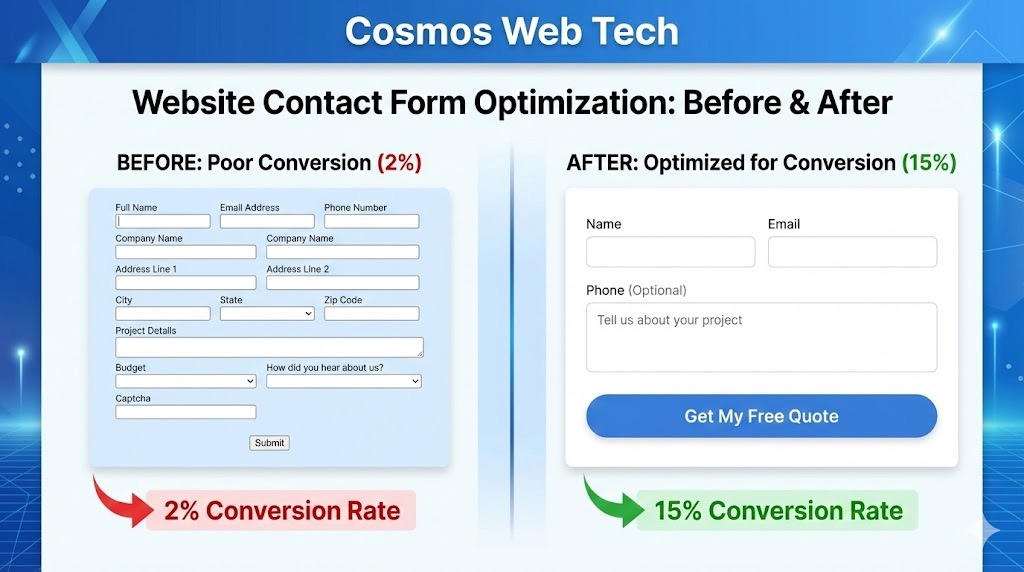
Every additional form field increases friction and decreases conversion rates. Studies show that reducing form fields from four to three can increase conversions by up to 50%. However, this doesn’t mean shorter is always better—it’s about finding the right balance between gathering enough information to qualify leads while maintaining a low barrier to entry.
Building Trust Through Design
Trust indicators play a massive role in form completion rates. Elements like security badges, clear privacy statements, and professional design can increase form submissions by 30-40%. Your form’s appearance immediately communicates your business’s credibility. Our website design services integrate conversion-optimized contact forms that build trust and drive leads from day one.
Strategic Form Placement and Design
The placement and visual design of your contact form can make or break its effectiveness. Here’s how to optimize both elements for maximum conversions.
Above-the-Fold Placement
Your primary contact form should be visible without scrolling on key pages like your homepage, services pages, and dedicated contact page. However, this doesn’t mean cramming a large form into your header. Consider a streamlined version that captures essential information with a “Get Quote” or “Contact Us” call-to-action.
Multiple Strategic Locations
Don’t limit yourself to one contact form per page. Consider placing forms at:
- The end of blog posts (when readers are most engaged)
- In your website sidebar
- As an exit-intent popup
- Within service descriptions
- On your About Us page
Visual Hierarchy and Flow
Your form should guide users naturally from top to bottom. Use consistent spacing, clear labels, and logical field ordering. Group related information together and use visual cues like different background colors or borders to separate sections.
Mobile-First Design
With over 60% of web traffic coming from mobile devices, your contact form must work flawlessly on smartphones and tablets. Our mobile-first responsive design approach ensures your forms are optimized for touchscreens and smaller displays. This means:
- Large, easily tappable buttons
- Proper input types (email, phone, etc.)
- Adequate spacing between fields
- Fast loading times
- Easy scrolling and navigation
Optimizing Form Fields for Maximum Conversions
The fields you include in your contact form directly impact both conversion rates and lead quality. Here’s how to strike the perfect balance.
Essential Fields Only
Start with the absolute minimum information needed to follow up with prospects:
- Name (consider first name only)
- Email address
- Phone number (optional initially)
- Brief message or inquiry type
For service-based businesses in Western Sydney, adding a “Project Budget” field can help qualify leads while providing valuable information for your sales process.
Smart Field Labeling
Avoid generic labels like “Comments” or “Message.” Instead, use specific, benefit-focused labels:
- “How can we help grow your business?”
- “Describe your project goals”
- “What’s your biggest marketing challenge?”
Required vs. Optional Fields
Clearly indicate which fields are required and which are optional. Use asterisks (*) consistently and consider making fewer fields required to reduce abandonment rates. You can always gather additional information during follow-up conversations.
Progressive Disclosure
For complex services, consider using conditional logic to show additional relevant fields based on initial selections. For example, if someone selects “Website Design” from a service dropdown, you might reveal fields about their current website or timeline.
Compelling Calls-to-Action and Messaging
Your contact form’s copy and call-to-action button can significantly impact conversion rates. Generic messaging won’t cut it in today’s competitive digital landscape.
Action-Oriented Button Text
Ditch the boring “Submit” button. Instead, use action-oriented text that creates anticipation:
- “Get My Free Quote”
- “Start My Project”
- “Claim My Consultation”
- “Send My Message”
The key is to focus on what the user will receive rather than what they’re giving up.
Value Proposition Integration
Surround your form with clear value propositions. What will visitors get by filling out your form? Consider adding:
- Testimonials or reviews nearby
- Response time commitments (“We respond within 24 hours”)
- Free consultation or quote offers
- Success statistics or case study highlights
Urgency and Scarcity Elements
When appropriate, add elements of urgency or scarcity:
- “Limited slots available this month”
- “Free audit offer expires soon”
- “Book your consultation today”
Be careful not to overdo this—it should feel genuine and valuable, not pushy.
 Social Proof Integration
Include social proof elements near your contact form:
- “Join 200+ Western Sydney businesses we’ve helped”
- Customer logos or testimonials
- Recent success stories or case studies
- Industry certifications or awards
Technical Implementation and Follow-Up Strategies
A great contact form means nothing if the technical implementation is poor or your follow-up process is lacking.
Form Functionality Essentials
Ensure your forms include:
- Proper validation (real-time error checking)
- Clear error messages
- Auto-complete support for faster filling
- Spam protection (reCAPTCHA or similar)
- Confirmation messages after submission
- Mobile optimization and testing
Database Integration and Lead Management
Connect your contact forms to a robust lead management system:
- CRM integration for automatic lead capture
- Email notifications to your team
- Auto-responder emails to prospects
- Lead scoring based on form responses
- Follow-up task creation
Response Time Standards
Speed kills—in a good way. Research shows that contacting leads within 5 minutes of form submission increases conversion rates by 9x compared to waiting 30 minutes. Establish clear response protocols:
- Immediate auto-responder acknowledgment
- Human follow-up within 1-2 hours during business hours
- Phone call within 24 hours for qualified leads
- Multiple touchpoints over the first week
Testing and Optimization
Regularly test different form elements:
- A/B test button colors, text, and positioning
- Try different field combinations
- Test various form lengths
- Experiment with different value propositions
- Monitor mobile vs. desktop performance
Use tools like Google Analytics and heat mapping software to understand how users interact with your forms and identify areas for improvement.
Measuring Success and Continuous Improvement
Implementing best practices is just the beginning. Ongoing measurement and optimization are crucial for long-term success.
Key Metrics to Track
- Form conversion rate: Percentage of visitors who complete your form
- Lead quality score: How many form submissions become qualified leads
- Cost per lead: Total marketing spend divided by leads generated
- Lead-to-customer conversion rate: Percentage of form leads that become customers
- Time to follow-up: How quickly you respond to new submissions
Regular Audit and Updates
Schedule quarterly reviews of your contact form performance:
- Analyze conversion data and identify trends
- Review user feedback and support tickets
- Test new form variations
- Update messaging based on seasonal changes or new services
- Ensure technical functionality across all devices
Transform Your Contact Forms Today
Effective contact forms are the result of strategic thinking, user-focused design, and continuous optimization. By implementing these best practices, Western Sydney businesses can expect to see significant improvements in both lead quantity and quality.
Remember, your contact form is often the first real interaction potential customers have with your business. Make it count by focusing on user experience, clear value propositions, and seamless functionality.
Start by auditing your current contact forms against these best practices. Identify the biggest opportunities for improvement and implement changes systematically. Test, measure, and refine until you’ve created lead-generating machines that work around the clock for your business.
The investment in optimizing your contact forms will pay dividends for years to come. Don’t let another potential customer slip away because of a poorly designed form—take action today and transform your website visitors into valuable leads.
Ready to optimize your website’s contact forms for maximum conversions? The Cosmos Web Tech team specializes in creating high-converting websites for Western Sydney businesses. Contact us today to discuss how we can help transform your website into a lead-generating powerhouse.
Your website’s performance depends on what’s behind it. Cloud Geeks provides the managed hosting, cloud, and IT support that keeps Australian SMBs online and secure.
Ash Ganda covers how Australian SMBs are using AI, automation, and digital strategy to grow without scaling costs proportionally.
If your business is also planning a customer-facing iOS or Android app — Awesome Apps builds cross-platform mobile apps for Australian SMBs.
Part of the Ganda Tech Services family, Cosmos Web Tech delivers specialist web design and digital marketing for Australian small and medium businesses.